Most people think controlling an RC car is simple.
Use the remote, move forward, turn, done.
But once you try different control modes like gesture or app control, things start to feel very different.
Some feel smooth. Some feel confusing. Some feel fun but hard to master.
So what’s actually going on?
Let’s break it down clearly.
Why Control Mode Matters More Than You Think
Your control method changes how the car behaves.
Not physically, but in how you interact with it.
What this really means is:
👉 The same car can feel completely different depending on how you control it
That’s why understanding each mode is important.
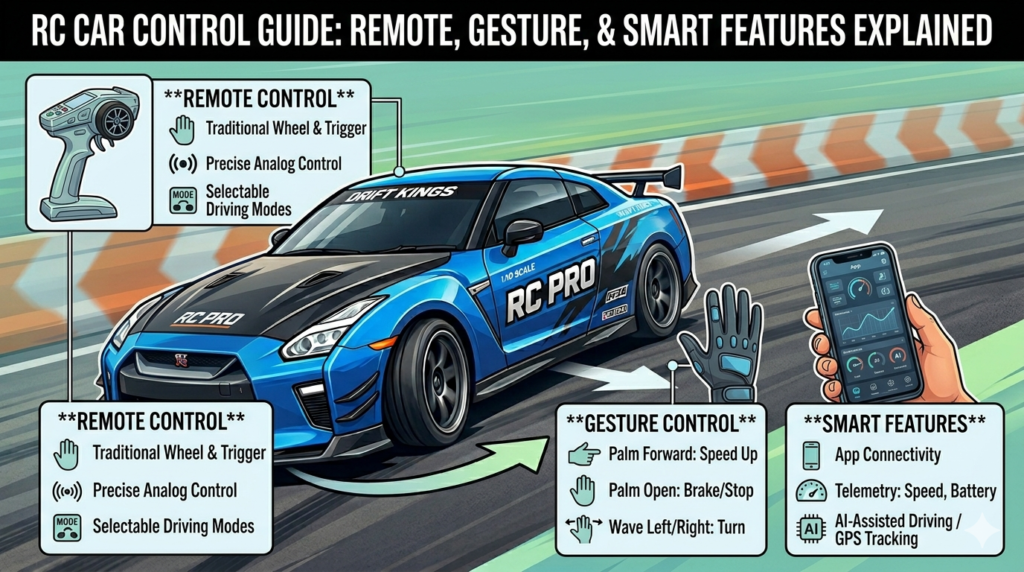
Remote Control: The Foundation
This is where everything starts.
Remote control is:
- Stable
- Predictable
- Easy to learn
You get direct control over:
- Speed
- Direction
- Movement timing
If you want precision, this is your best option.
Here’s the thing.
Every advanced control method still depends on understanding this first.
If you’re not comfortable with remote control, other modes will feel harder.
Gesture Control: Fun but Requires Practice
Gesture control feels exciting immediately.
You move your hand, the car responds.
But it’s not always accurate at the beginning.
Why?
Because:
- Your hand movement needs to be controlled
- Sensors need clear signals
- Timing matters more than you think
At first, movements feel delayed or over-sensitive.
With practice, it becomes smoother.
Best use:
- Casual play
- Interactive fun
- Showing off cool features
App Control: More Control, More Options
App control sits somewhere in between.
It gives you:
- More precise inputs
- Additional settings
- Better control customization
Some apps allow:
- Speed adjustment
- Control sensitivity
- Extra movement options
What this really means is:
👉 You can fine-tune how the car behaves
But it depends on the app quality and your comfort using it.
Which One Should You Use?
Let’s keep it simple.
- Want control and precision → Remote
- Want fun and interaction → Gesture
- Want flexibility and settings → App
There’s no single “best” option.
It depends on how you want to use the car.
Switching Between Modes the Right Way
If your car supports multiple modes, don’t jump randomly.
Start with:
- Remote control (build base skills)
- Try gesture control (understand movement)
- Explore app control (fine-tune control)
This order makes learning easier.
Common Problems and Fixes
Car not responding properly
- Check battery
- Check connection
- Stay within range
Gesture control feels off
- Use slower hand movements
- Avoid sudden gestures
App control lag
- Check phone connection
- Keep app updated
Most issues are simple once you know what to check.
How to Get the Best Performance
No matter the control mode, these basics matter:
- Keep movements smooth
- Avoid sudden inputs
- Practice regularly
- Use proper surface
- Keep battery charged
Control improves when your inputs become consistent.
Advanced Tip: Combine Control Styles
This is where things get interesting.
Use:
- Remote for precision driving
- Gesture for fun moves
- App for tuning
You don’t have to stick to one.
Switch based on what you’re doing.
Final Thoughts
RC cars are not just about speed.
They’re about control.
Once you understand how each control mode works, you stop guessing and start driving with intention.
That’s when the experience actually becomes enjoyable.
If you’re exploring RC cars, try different control modes and see what fits your style.
And if you’re serious about improving, start with the basics and build from there.